
Every business needs visuals that stop people from scrolling but not every business has a design team ready to create them. That gap is exactly where Canva for beginners changes everything. Canva is a free online design platform that makes professional quality graphic design accessible to anyone regardless of experience, skills, or budget.
What Is Canva and Why It Matters
Canva is a browser based design platform that lets anyone create professional visuals without design software or technical skills.
Since 2013 it has grown into one of the most widely used online design tools with over 170 million users worldwide.
Who Uses Canva?
- Small business owners creating social media and marketing visuals
- Startups building brand identity without a design agency
- Marketing teams producing content quickly across platforms
- Educators and students creating presentations and reports
- Content creators designing thumbnails reels and story graphics
Canva for Beginners: Core Features You Need to Know
Getting started is genuinely straightforward. The platform is built around simplicity, speed, and creative freedom that anyone can access from day one.
| Feature | What it Does |
| Templates | Ready made designs for instant use |
| Brand Kit | Store logo fonts and colours in one place |
| Drag and Drop | Move elements freely without technical skills |
| Magic Resize | Resize any design for every platform instantly |
| Collaboration | Invite team members to edit together |
| Stock Library | Millions of free photos and icons available |
Beginners looking to improve their design skills can explore Canva Design School, which offers tutorials, templates, and creative tips for creating professional visuals.
Canva as an Online design tool
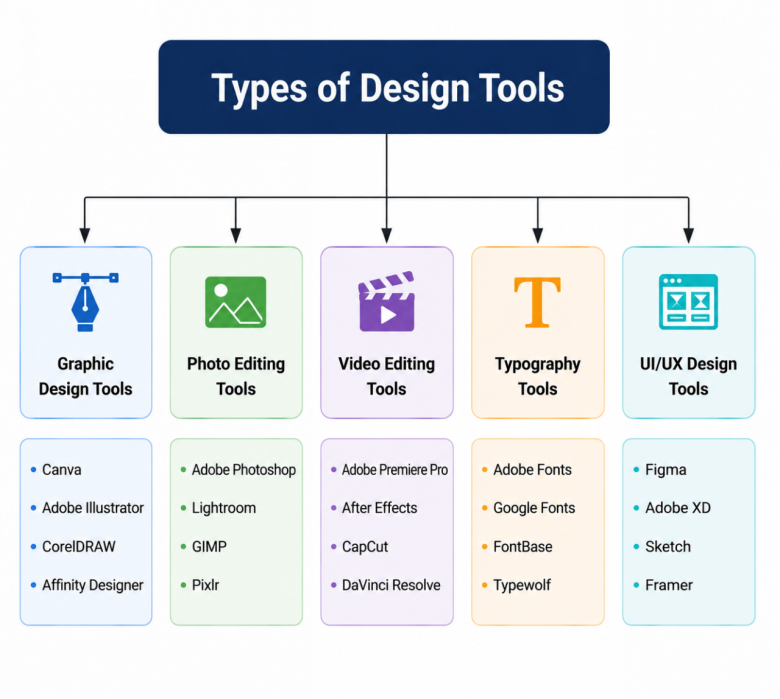
At Kanavu Technologies our digital team creates brand visuals every day with speed, flexibility, and quality across every platform without slowing down our workflow. That is the real power of Canva for beginners and experienced designers alike.
What We Create With Canva?
- Social media posts stories and reel covers
- Brand identity documents and typography guides
- Presentation decks for client meetings and pitches
- Marketing materials including flyers and banners
- Blog images and website visual content
Canva for Marketing: Quick Tips That Actually Work
Smart marketing visuals follow clear principles that make them perform better across every platform.
Quick Start Tips
- Use brand colours and fonts consistently
- Keep text minimal always
- Use high contrast for readability
- Resize for each platform
- Use brand kit to stay consistent
- Test styles and track performance
Canva offers numerous features that help businesses create engaging content for various platforms. Discover the different ways to use Canva for social media purposes and make your marketing visuals more effective.

Why Canva Works for Every Business?
Whether you are a solo founder or a growing team, Canva for beginners scales perfectly with your needs. The free plan covers everything immediately. The pro plan unlocks advanced features for teams that need more power and flexibility.
At Kanavu Technologies every business deserves stunning visuals regardless of budget or team size. With the right guidance it becomes one of the most powerful tools in any creative toolkit.