
A 404 Not Found error appears when a server cannot find the webpage or resource requested by a visitor. It commonly happens when a page is deleted, moved, or the URL is entered incorrectly.
Understanding the cause helps you fix the issue and provide a better experience for visitors.
What Is a 404 Error?
A 404 Not Found is an HTTP status code that tells the browser that the requested resource could not be found on the server.
For example, if a visitor opens: https://example.com/old-page and that page no longer exists, the server may return: 404 Not Found
Broken or dead links can lead visitors to these pages and may create a poor user experience.
What Causes a 404 Error?
- Deleted pages – The webpage has been removed.
- Moved pages – The URL has changed without a redirect.
- Incorrect URLs – A visitor enters the wrong address.
- Broken links – Internal links point to pages that no longer exist.
- Outdated external links – Other websites link to an old URL.
- Incorrect URL structure – Changes to folders, slugs, or routing can create missing pages.
How to Solve 404 Error in Website?
1. Find the Broken URL
First, identify which pages are returning a 404 error. You can check:
- Google Search Console
- Website analytics
- SEO crawling tools
- Server logs
Finding the exact URL makes it easier to determine the right fix. Regular website monitoring can also help you identify site speed and performance issues that may affect your website.
2. Redirect the Old URL
If a page has been permanently moved, create a 301 redirect from the old URL to the most relevant new page.
Old URL → New URL
This helps visitors reach the correct content instead of seeing an error page.
3. Restore the Deleted Page
If the missing page still has useful content or receives visitors, consider restoring it. You can recover it from a backup or recreate the page.
4. Fix Broken Internal Links
Check your website’s:
- Navigation menus
- Blog posts
- Buttons
- Footer links
- Category pages
Update links that point to incorrect or deleted URLs.
5. Check External Links
If another website is sending visitors to an outdated URL, contact the website owner and request an update.
If the old page has a suitable replacement, a 301 redirect can also help.
Create a Helpful 404 Page
A custom 404 page should help visitors continue browsing instead of simply showing “Page Not Found.”
- A simple error message
- Search bar
- Homepage link
- Popular pages
- Relevant content suggestions
The design can be simple or creative, but visitors should immediately understand what happened and where they can go next.
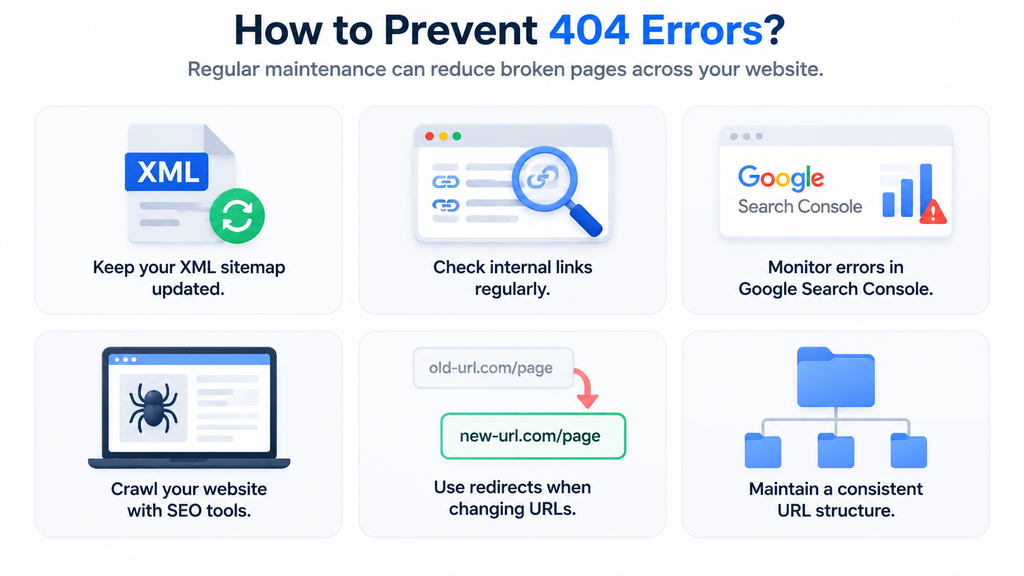
How to Prevent 404 Errors?
Why Fixing 404 Errors Matters for SEO
A few 404 pages are normal, but too many broken links can affect user experience and website crawling.
Regularly fixing important 404 errors keeps your website easy to navigate and maintain.
Also Read: If you’re dealing with other website problems beyond 404 errors, explore our Website Problems and Fixes: A Complete Guide by Kanavu Technologies for practical solutions to common technical issues.
Frequently Asked Questions
A 404 error means the server cannot find the webpage or resource requested by the visitor.
The most common causes are deleted pages, moved URLs, incorrect URLs, and broken links.
A 404 page itself is not automatically harmful, but many broken internal links can create a poor user experience and affect website maintenance.
No. Redirect a removed or changed URL when there is a relevant replacement page. Otherwise, keeping an appropriate 404 response may be better.
You can use Google Search Console, SEO crawling tools, analytics, and server logs to identify missing URLs.