
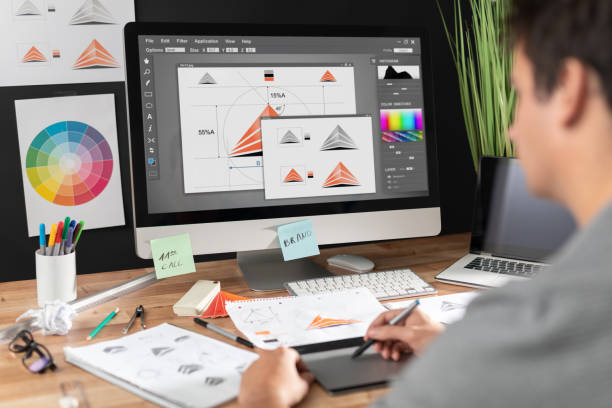
Introduction The difference between UI and UX Design, what exactly is it? They both sure do sound the same, but are they really different? Let’s get things straight. As mentioned earlier, both concepts seem to be very similar due to their names. You may think – what’s the difference between them? To know that first of all we must know what UX Designs and UI Designs are. Although their professional similarities are almost the same, they have different roles. What is UX Design? It is a User Experience Design that designs products both in virtual and physical ways. Don Norman is the first person to coin the term User Experience during the late 1990s. UX is the interaction between the user and a product or service. This is the process of developing the interaction between the facets of a company and the user. UX Design is a non-digital practice but used and defined by the industries digitally. It’s all about the feel of the experience. What is UI Design? UI Design is all about the look, feel, presentation, and interactivity of a product. UI Design is strictly based only on digital means. To exactly define what UI Design is, everything we use has some connection with User Interface Design. For example – the touchscreen in your smartphones or the touchpad you use to select a cup of coffee in a shop, book a train ticket, and other similar things we do. A few other examples are – websites, apps where it’s all about the feel, the look, and the interactivity of the product. It should be very carefully handled. Usually, a UI Designer considers things like the icons and buttons, spacing, imagery, responsive design, typography, and color schemes. Difference between UX and UI Design – The Obvious Ones UX and UI are the most confusing terms. Most frequently people take its meaning interchangeably. But both go hand in hand. UX Design deals all with the overall feel of the experience, while UI Design is about the product’s interface look and function. A UX Designer should have in mind the user’s entire journey to solve the problem. Their works are mainly based on the problems that arise from the user’s point of view. They create wireframes that are believed to be bare-bone blueprints for the product. The UI Designer gives life to the designs that are built by UX Designers into the visual designs and makes them digital. UI Designers make the entire journey possible. Differences Between the UX and UI Design – More Specific UI deals with the interaction between the end-user and the products, while UX design deals with the functionality and the purpose of the design UX has direct communication with the users and it can make changes with the users’ comfort and correct mistakes easily. However, UI has no connection with the users directly; they must have a continuous watch on the users to understand their needs and satisfaction. UX Design carries out the whole project development and ideation. UI offers a complete finished product to the users. The differences in the colors they use for designing usually UI Designers use all types of colors while UX Designers use only 3 main colors white, gray, and black. This is because when a UI Designer creates a navigation bar, he wants it to be colorful to attract users. But UI Designers will not have many tough jobs adding colors just note left would do so. The tools used by UI and UX Designers: For UI designers, designing an image is of primary importance, so they use tools like Flinto and Principle. While the UX designers use wireframes which makes it simpler to provide the designs. And tools like Mockplus, Balsamiq, Axure are helpful for UX Designers. What tells you that UI is not UX? Interfaces are made beautiful by UI while useful by UX. They are a complement to each other UX Design is the primary design that precedes the UI Design which finally gives a complete design. UX is made to achieve goals whereas UI is to connect with the users’ emotions, satisfaction, and thoughts. UI is connected to the interface while UX is everything of the design.UI Designer’s key responsibilities: It’s all about the design’s look, feel, the work’s responsiveness, and interactivity of the product with the user. And the responsibility of making the website intuitive. Key Responsibilities – UX and UI Designers UI needs critical thinking and UX needs convergent thinking. However, both need creativity. Only the most creative minds can interpret the difficulties faced by users. Creativity will further enhance the usability of an application. The UX and UI departments have to work together to keep each other informed about the project’s progress and come out with innovations that benefit the users. Conclusion I hope you understood the difference between Ui and UX Design, in short here is what you have to remember – UI and UX are interlinked to each other and they work best together. One can’t exist without the other, but at the same time, both terms can never be interchangeably used.
UI Design – A BASIC GUIDE
Introduction – UI Design UI Design stands for “User Interface Design”.This is a digital procedure. Designers use it to build interfaces, based on their looks and styles.UI encloses both the appearance and interactivity of an App. A UI Designer must follow certain criteria to create a design. To put it in an easy explanative way, A UI Designer must see what to put on the page. And the change in the button colors when you click on them Ui design, however, is very different from UX Design. Having an understanding of the difference is very important. Know more about the difference between UI and UX Design. Different forms of user interfaces linked with UI Design There are three different types, they are Graphical user interfaces(GUIs) Voice-Controlled Interfaces(VUIs) Gesture-Based Interfaces Graphical user interface It is interaction with electronic devices through the internet. Their main use is primary notions, command labels, and text navigation. The desktop of a computer is a Graphical user interface. The graphical user interface deployed commercially in Apple’s Macintosh and Microsoft’s Windows operating systems during the 1970s. A problem that came up regarding the inefficient usability in command lines led to the development. Developed in the laboratory of Xerox Palo Alto, it is the best programming language for Graphical user interfaces, are C# and Java are the most preferable languages that are being used. Others that may be considered are Python, HTML5, and C++. Examples of Graphical User Interfaces Sketchpad which was developed in 1962 on the MIT campus by Ivan Sutherland, is found as the very first computer-aided graphical design program. This had the features that use a light pen which enables the users to create in both real-time and coordinate axis in engineering drawing. The real-time user examples of Graphical user interface which are very interactive applications to the users such as, ATMs, video games, smartphones, check-in, self ticketing, and desktops. Voice-Controlled Interface Its speech interaction with computers makes it possible for speech recognition, commands, and spoken replies from virtual speech assistance. Examples of this type of user interface are Siri speech assistant in iPhones, Alexa on Amazon devices, and a lot more of the same type. The first-gen voice user interface was introduced in the year 1984 by SpeechWorks and Nuance. These were done using the Interactive voice recognition(IVR) systems. Usage of the same design guidelines for both GUIs and VUIs is an impossible task. This provides a roadmap for the business. The smarter we design the VUIs the more experience and results we get. If they are up to reading a human’s psychology what else does this technological world need. Every VUIs should be designed with excellent spoken and listening skills to make the required task possible and easier in all ways. Examples of Voice Controlled Interface Siri Alexa Cortana Google Assistant Real-Life Uses of The VUI – Video User Interface VUI For Hotels This can play a vital role in the hotels because when tourists come in, they would look for new, restaurants and lots of such needs it can even help them in their works like controlling the AC temperature, ordering food from the hotels, cafe. VUI for Workspace This is another main use of the VUIs. If we have VUIs assistants work becomes simpler, easier, and doesn’t consume much time. We need to search, spend time looking for what we need. However, when VUIs are around and are used your job is easier a voice note would make everything much simple. Even it can make u learn things easier and faster. VUI for E-Commerce It enables the users to do hands-free shopping and makes this job also easier. If you ask for something you need, it provides you with the best matching option. Gesture-Based Interfaces It is the recognition of gestures with which interfaces are operated. Gestures like tilting, tapping, shaking, and physical actions. What criteria must UI designs match to the needs of their customers: UI Design should satisfy the user’s satisfaction. It must gain users trust UI Design must communicate brands and should be connected with the emotions of the user. Gesture-Based Interfaces This has become part of everyday lives. Gesture-Based UI is the recognition of the physical motions that are made by the users and their responses. The touching, scrolling, pinching, rotating, moving everything comes under this. The most common places where we use Gestures-Based UIs are smartphones. Starting from tablets, Smartphones to smart mini-laptops everything runs under gestural UIs. The most recent innovation in this technology is the invention of eye movement recognition. The most recent smartphone, Samsung Galaxy S4 is the latest smartphone that has been invented with the introduction of eyeball movement. In this, the screen scrolls itself recognizing our eyeball movements. UI DESIGN PRINCIPLES Be Conscious of Consistency keeping in mind the consistency of the work we do, we must take in both the internal and external consistency of work. We must check the colors we use, the typography, animations, and every basic design guide. For instance, when we talk about internal consistency, if a user wants to fill a form with two different pages to be submitted and the form has ‘send’ as a button in one of its pages and ‘submit’ as another, it leaves the page users confused. so every small thing must be noticed and to be done with consciousness. External Consistency to be clearly explained, If a user wants to visit the home website’s page, he/she must get a home page option in their page but think if it’s given house instead, the users will be left in confusion. So every action must be conscious and consistent throughout. Make users feel comfortable with controls Users must feel easy and feel comfortable without difficulties and hesitation. For example, If users want to close the dialogue box that pops out, it should be made possible to make users feel in control and take their own extra time in exploring the things. Provide feedback to users in UI Design While we provide feedback to

What is WordPress? – A Beginner’s Guide
What is WordPress? WordPress is one of the popular content management systems that aid you in making your own blog or website. Almost around 39.5% of all the sites that you can find on the internet are powered by WordPress. This platform possesses a GPLv2 license. So it is available for free to everyone that they can make use of it or modify it for their purpose. It’s a cake-walk for you to develop your own website or blog with WordPress while managing all the contents as well. You will indeed not need any prerequisite knowledge of computer programming to use WordPress. Initially, bloggers were using WordPress prominently. But at present, the usage of WordPress has extended to creating a lot of Business websites, Blogs, Resumes, Forums, Social Networks, Portfolios, Membership Sites, and whatnot! Why Do We Recommend WordPress? WordPress, as we know already, is an open-source content management system available for free. There are a lot of open source themes and plug-ins that you can avail yourself to make your page look unique. Without being an expert in programming languages, you can make changes to how your website looks with WordPress. Themes can modify the website atmosphere while plugins can modify the way your site functions. For example, Plugins are used while developing an eCommerce store. At present, WordPress offers more than 50,000 plugins and around 5000 themes for free. WordPress is a flexible open-source CMS tool wherein you can develop any type of website while letting the same evolve in time. There are a lot of tutorials, blogs, and other sources of help if you need any in case you encounter any issues with WordPress. Getting Started Domain Names We usually use a domain name to let the users identify our website. It is a part of the URL. Choosing the right domain name might seem a little difficult. This is because if you own a brand that is named with common English words, then finding a domain name with the same words might be difficult as it would’ve been taken already. It is commonly advised that you choose a domain name that is short and crisp. Moreover what you do with your website matters more despite the fact that branding is important. If you are genuinely into branding, then you can probably register your domain so that you get legal ownership of the site. The registration, by default, is usually for one year. If you have enough funds and at the same time if you are very much serious about taking your brand to another level, then you may even get your domain registered for five or six years. To remind you about the security issues, it is always better to keep your domain and hosting account separately. If someone could get into your hosting, then there might be a possibility of your domain being completely taken away somewhere leaving you empty-handed. Hosting Packages You can choose either of the three options that are given below Shared Hosting VPS Hosting Managed WordPress Hosting Shared hosting This might seem to be a good option because you can use a single server to house a number of websites while you can afford it with just $5 per month. But still, it comes with a number of negative factors. One of them is the bad-neighbor effect. This means that any attack targeting a single website might end up affecting the other websites as well making them unavailable. This obviously affects security and is often unpredictable. Some of the companies from which you can avail the shared hosts are A Small Orange, Inmotion Hosting, MediaTemple, and SiteGround. VPS – Virtual Private Server It works more like shared hosting but it keeps away the negative aspects of shared hosting. Attacks may happen but in most cases, it is predictable because the usage percentage is equally divided between the number of users accessing the same servers. For example, four users can get access to 25% of the assets each. So the attackers will have a very feeble chance of getting access to the other websites even if they attack one website. If you have enough funds you can choose VPS. Some of the providers for VPS are A Small Orange, Linode, MediaTemple, SiteGround, and Vultr. Managed WordPress Hosting is like availing your website from WordPress.com. The whole construction of the server has been regulated to toil with WordPress effectively. This might be a safer and faster option. It provides automatic updates as well as server-level caching. Besides this, you can expect WordPress-specific support that is completely professional. One of the downsides of this option is that it is not as flexible as the other two options and some of the plugins might be disabled for security concerns. Flywheel, Kinsta, Pantheon, MediaTemple, and WPEngine are the providers of managed hosting. WordPress Installation If you have managed WordPress Host, you can probably get through this step by simply filling up a form followed by the installation of WordPress to your account. But when it comes to VPS, you are left with two options: One-click installation and Manual installation. Most of the hosts usually provide tools for making the installation easier. Even if you would like to take up the manual option, it will not turn out to be difficult. You will have to transfer all the files to the Domain folder as soon as you are done with downloading WordPress. Later, make a database and place the browser to the domain. You will now have to follow the instructions that are displayed on the screen. Themes And Plugins Plugins Let us begin with Plugins. Plugins are usually used for making the website function in a specific way. So you will have to choose a plugin depending on the type of website you want to develop. Plugins are usually correlated to the theme and the backend of WordPress when it comes to functioning. If you are to start a business website, then you can probably opt
UX design and its top blogs to follow
You would be amazed to know that there is no exact definition for this word as generally it is quoted as “User Experience “design . The user experience has many dimensions .It has many roles starting from competitor analysis, Customer Analysis and user research, Product Structure and strategy, content developing, prototyping and wire framing, Testing and iteration, Coordination With UI design and Analysis and Iteration. After reading this you could be tired but the role of UX design does not ends here, it has lots more to give. Let me define the UX design based on the above process: The UX design is the operation of plotting (physical or digital -based) products that are functional, easy to use, portable and delightful to interact with. It is all about increasing the experience that people will have while interacting with your product, and making sure they love and find worth in what you’re giving. Goal of UX design: The target of UX design is to “better customer happiness and fulfillment through the utility, ease of use, and pleasure provided in the interaction with a product and while using it.” These statements reminds the quotes “ Customer is the king”. The motive behind choosing UX as your interest A very big motive to go for UX design is because it is an industry top Trending topic and to be a professional who is looking in this industry. The same way the profession like graphic design and web development.UX design has emerged for a reason and is very important topic to look for . It is about developing a better digital world for humanity and the well being of society. This field always requires innovation, logical thinking and creative ideas to rule this world. UX design and illustration becomes important as it will dircetly helps you to know every angle of consumer angle especially their interest and their buying strategy for the upcoming years.According to the study the professionals who are hired for Ux design are usually paid very high as they understand the consumer or customer mindset and lead the company based on that.let’s go through some useful tools and resources .what are we waiting for!! Let’s bring to light some of useful tools and resources The UX blog is one of the great places to discover new tools for many things such as trade or improvement in technology. Many UX blogs contain very useful guides on the way to use these designing tools or UX tools. It is a wonderful place to look for many heart -throbbing inspirational examples when it comes to design and especially UI – design. Moreover, many of these design blogs on the list are full of examples, and illustrations etc… There are so many other resources which will help you to locate many tools and significant ways to make it more compatible and portable. Let’s go through a few of the UX blogs which will keep you updated with the trend. 1.Smashing Magazine This magazine is very famous among those techno -savvy people who have interest in the area of digital designing work.. These UX magazine blogs have frequent posts that are up-to-date and highly informative and written by UX design experts such as Nick Babich and Vitaly Friedman. This Magazine covers almost everything from monthly web development and lots more.It also lists many important design developments every month. Here,You can find many fashions and approaches from other UXers in this field. The best part of this UX blog is that it even includes many interesting and less touched-upon topics. You can find posts on various subjects such as psychology, biology, and the design area. 2. Nielsen Norman Group You could have guessed by now that this is quite a familiar name and if you are thinking that, then you are right. Yes he is the co -founded the UX founding features he is also known as the UX father. Many educational driven research and Ux design are still driven from his ideas and philosophy. Almost many topics of this blog revolve around user testing and user behavior of the user consumer. They post features on UX for ecommerce, mobile design ,user friendly and portability. While the posts are science oriented, they’re written in such a way which makes readers have more quest and patience less for upcoming blogs.The intensity level of their blog increases rapidly. 3.UX Matters This blog focuses on research, usability and design of the Ux. It has tips for everyone for beginners as well as advanced designers with lots of experience oriented research, including out of the area topics which are away from these topics are also covered. In this blog you can find n -number of practical tips for UX designers ,in case you stayed out of budget during research, it would make you stay on budget during research, and while communicating with developers. It gives you details of a wide range of interesting topics. you can also find topics on industry 2.0 such as AI with UX design,it will deal with AI tools which will make your design more awesome. 4.UX Magazine This blog regularly publishes posts with tagging headlines about the trending topics in UX design and cover. They cover a wide range of valuable and exciting points concerning AI design and bot design and many other technologies. This UX blog is the right destinatio to hold on for news on nearby conferences and training opportunities in the field of UX design. Moreover, it’s a great place to connect with other designers in this field, as you can register and create an account too. 7. UX Movement It is brilliant for great visuals and for tabulating examples of UX-friendly website and smart devices app design. Apart from finding many posts ,they are concerning design principles and practical information. So finally we are at the end of this beautiful journey ,This journey had many beautiful stops where we learnt about UX design and its various uses. Various types of blogs. Apart from these UX